
Design with the AI you already use
Talk to it inside the app, or let your coding agent design while you work. Your plan, your keys, no second subscription.
AI inside the app, on your own plan
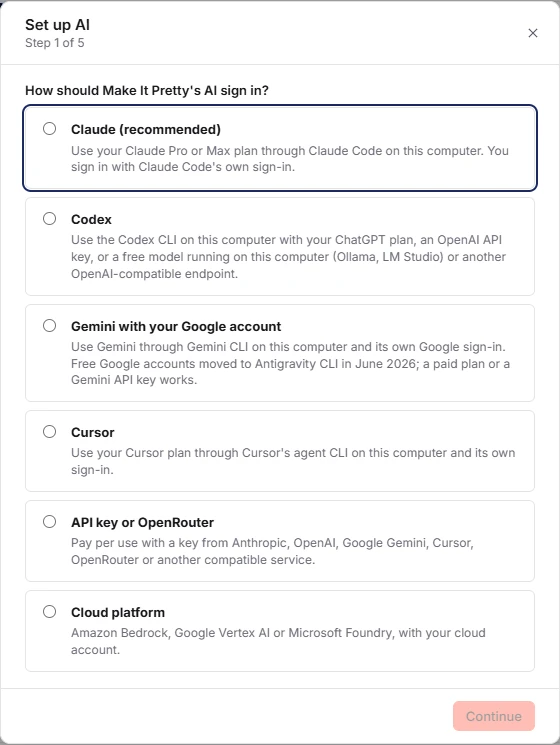
Ask for a screen or select layers and ask for a change. The AI tab signs in the way you already pay for AI, and a five-step setup walks you through it.
- Claude Pro or Max through Claude Code's own sign-in on your computer.
- ChatGPT through Codex, or an OpenAI API key.
- A free local model with Ollama or LM Studio. Nothing leaves your computer.
- Gemini, Cursor, OpenRouter or a cloud account on Bedrock, Vertex AI or Foundry.
Let your agent design as much as it wants
Some design tools now cap AI agent calls by the day or week. Make It Pretty™ doesn't count them. You pay for your own AI plan, and that's all. See the comparison.
Connect your agent
35 MCP tools on one local server, ready for Claude Code, Codex, Cursor, Gemini CLI and Claude Desktop.
- Agents edit real files. They create documents, add frames, text, components and stock photos, check the layout and save. Their changes are outlined on the canvas until you accept them, and each one can be undone.
- You stay in charge. A new agent can only read until you allow its edits, and the activity log names every change it made.
- Works with the editor closed. Make It Pretty™ runs from the tray, so a coding agent can draw a screen while you're in your terminal.
- One click to connect. In the AI tab, open Settings and choose Claude Code, Claude Desktop, Cursor, Codex or Gemini CLI. The app shows the exact config change and backs the file up first.
- Claude Desktop: install the extension. Download it for Windows, Apple silicon or Intel Mac and double-click it, or choose "Install for Claude Desktop" in the app's Settings.
Or add it by hand to any MCP client
Windows
{
  "mcpServers": {
    "make-it-pretty": {
      "command": "C:\\Users\\you\\AppData\\Local\\Programs\\Make It Pretty\\resources\\bin\\makeitpretty.exe",
      "args": ["--mcp"]
    }
  }
}
Mac
{
  "mcpServers": {
    "make-it-pretty": {
      "command": "/Applications/Make It Pretty.app/Contents/Resources/bin/makeitpretty",
      "args": ["--mcp"]
    }
  }
}
Replace "you" with your Windows user name.
Close the window. Your agent keeps designing.
Make It Pretty™'s design engine is a small native program, separate from the editor. Close the editor and the engine waits in the system tray on Windows or the menu bar on a Mac, ready for the next call from your agent. You don't have to launch the app first, and your designs never pass through anyone's cloud to get there.
-
Designs with the editor closed
Agents create, edit, export and save files while no window is open. Open the file later, or keep it open and watch the changes arrive live.
-
Native speed
Layout, drawing, saving and export run as compiled Rust. The canvas runs the same engine in WebAssembly, so dragging and zooming never wait on another process.
-
Light enough to leave running
The tray program can start when you sign in and idles quietly. The full editor only runs while its window is open.
-
A private channel, no open ports
Agents reach the engine through a channel only your user account can open. There's no network port to find and no token file to steal.
-
The right file, every time
Every agent call names the document it means. Nothing is ever sent to whichever window happened to be in front.
-
Saves you can trust
Files are written to a temporary copy and swapped in whole, and a crash journal brings back unsaved edits the next time you open the file.
-
A locked-down editor
Sandboxed windows, a strict content security policy, and keys kept in your operating system's keychain instead of plain files.
-
Polite with your other tools
Connecting an AI client is your choice. The app shows the exact change, backs up the file first, and never touches its permission or allow-list settings.
-
Tested and signed
More than 1,500 automated tests run before every release, and every installer is code-signed, with the Mac version notarized by Apple.
Download Make It Pretty™
Free. Version 0.3.1.
Free. Use the AI you already pay for. Donations keep it going. Chip in
Windows
Windows 10 or 11, 64-bit. Installs for your user, no admin rights needed.
Download for WindowsUsing Claude Desktop? Get the extension for Windows, Apple silicon or Intel Mac.
All files and release notes are on GitHub.